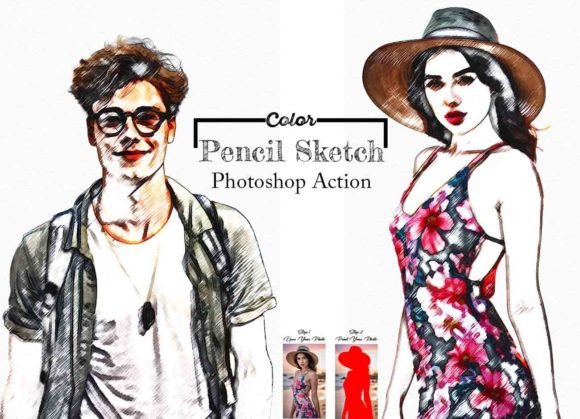
Transform Photos into Art with Color Pencil Sketch Photoshop Action
Every photographer and designer knows the challenge: you have a perfectly good photo, but it needs something more. It needs character, a distinct style that makes it stand out in a crowded visual landscape. This is where a powerful tool like the Color Pencil Sketch Photoshop Action comes into play. It’s not just a filter; it’s a bridge between digital photography and the timeless, tactile appeal of hand-drawn artwork. This action meticulously analyzes your image and rebuilds it with the textures, strokes, and organic imperfections of a real color pencil sketch, offering a unique aesthetic that pure digital tools often struggle to replicate.
Understanding the Visual Appeal of a Pencil Sketch Effect
The charm of a pencil sketch lies in its humanity. It carries the slight wobble of a hand-drawn line, the varied pressure creating thick and thin strokes, and the layered, granular texture of graphite or colored pigment on paper. The Color Pencil Sketch Photoshop Action captures this essence. The resulting image feels personal and crafted, evoking nostalgia and artistry. Unlike a generic "sketch" filter, a well-designed action understands the nuance of light and shadow, translating tonal values into carefully placed strokes that suggest form and depth. The personality is artistic, slightly vintage, and inherently creative, making it perfect for projects that aim to feel handmade, authentic, and emotionally resonant.
Where This Style Truly Shines: Practical Applications
The versatility of this effect extends far beyond personal photo albums. For brand identity, it can be a game-changer. Imagine a bakery's social media graphics where product photos are rendered as inviting sketches, or a boutique hotel's website featuring its architecture in a sophisticated pencil style. This approach adds a layer of warmth and craftsmanship to a brand's visual language. In editorial design and packaging design, the sketch effect can create striking cover art or illustrate product ingredients in a way that feels organic and trustworthy. Bloggers and content creators can use it to produce unique featured images or infographic elements that capture attention in a feed saturated with standard photography. Even for logo design and web design accents, this texture can be used to create standout elements that break the mold of clean, flat digital design.
Integrating the Action into Your Creative Workflow
Using the Color Pencil Sketch Photoshop Action is designed to be straightforward, even if you're not a Photoshop expert. The process begins with a properly prepared image. As noted in the instructions, resizing to a consistent dimension like 3000x2000 pixels at 72 PPI ensures the action's strokes and details scale correctly. The key step of creating a "paint" layer is where you, the artist, guide the effect. By painting over your subject with a brush, you define the primary area of focus, allowing the action to apply its detailed sketch effect precisely where you want it. This level of control is crucial for professional results, ensuring the effect enhances rather than overwhelms your subject.
The action’s compatibility with a wide range of Photoshop versions, from CS6 to CC2022, makes it a reliable design asset. The inclusion of an ATN file, help guides, and even a video tutorial demonstrates a commitment to user success. For marketers and entrepreneurs, this means you can quickly produce a series of consistent visual assets—like a collection of sketch-style portraits for a campaign—without spending hours manually redrawing each image. The organized layers and color change options provide further customization, allowing you to tweak the final output to match specific brand colors or desired moods.
Making the Most of Your Sketch-Style Images
Once you've generated your color pencil sketch, consider how it interacts with other design assets. The textured, often detailed nature of a sketch pairs beautifully with clean, minimalist typography. Think about using a simple sans serif font for captions or a elegant serif font for headlines to create a compelling visual hierarchy. The sketch becomes the artistic focal point, while the type provides clear, readable information. This combination of an expressive display font style (the sketch) with functional text is a powerful strategy in modern graphic design.
For personal projects, this action is a fantastic way to create unique gifts, such as custom portraits for family and friends, or to develop a distinctive style for your photography portfolio. The high-quality result ensures that the final piece looks professional and polished, worthy of printing or digital display. Remember, the goal is to use the tool to express your vision, not to let the tool define it. Experiment with different source photos, play with the "paint" layer to highlight various elements, and use the color options to find the perfect palette. The Color Pencil Sketch Photoshop Action is a powerful addition to any creative's toolkit, offering a direct path to creating images that are not only seen but felt.